Computer reallocation: depot is now web server

I’ve mostly finished migrating my web server to depot.

I did this to gain RAM and CPU (mostly the former). My old web server was an Atom D510 based machine with 4G of RAM. Most of the time this wasn’t a huge issue, but it was holding me back from putting more of my own software on it and I couldn’t easily run multiple jails or bhyve. depot has 32G of RAM and an i5-2405S, which should be sufficient for my needs for a while.

It’s worth noting that the big hog on my web server is mysql. I’m looking to get rid of it, but that means replacing my blog since WordPress requires mysql. I already wrote my own gallery software to replace gallery3, I have no reason to believe I can’t replace WordPress with something of my own that is simpler and consumes fewer resources. I’m also growing tired of the security issues that regularly crop up with WordPress; I’m certain I can produce something more secure.

New (to me) server up and running: kiva

I recently bought a server from eBay to replace the duties of my storage server (depot). depot will become my web server. I needed to do this because my web server was an Atom D510 based system. I need more RAM than can be addressed with an Atom D510. I also wanted ECC memory in my storage server since I’m about to start using ZFS pools and can use the integrity provided by ECC.

The server I bought is overkill for my current needs, but it was inexpensive because it’s older technology. It is a Supermicro X8DTN+ motherboard with a pair of Xeon L5640 CPUs and 48G of registered ECC RAM (six 8G sticks). It’s in a Supermicro SC826 chassis with a BPN-SAS-826EL backplane. This wasn’t the backplane I wanted; the eBay description was incorrect. However, it’ll work for my needs since I don’t really need more than 4 SAS lanes. As an upside, the cabling is cleaner than SFF to SATA breakout cables. I’m using an LSI 9211-8i PCIe x4 HBA to connect the backplane to the motherboard.

As an aside, I’ve never owned a machine with 12 CPU cores that can run 24 hyperthreads. While the L5640 runs at a paltry 2.26GHz, it is very handy to be able to run gmake -j24 when doing software development. I’m using a Crucial MX100 512G SSD as my OS drive, because it was inexpensive (an Amazon Prime Day deal). I would normally choose a Samsung 850 Pro, but I couldn’t justify the price for setting up this machine. I can always change it later. At any rate, compiles of my software are speedy on this machine, which means I can get back to finishing my BGP-4 development along with some other things.

The new machine is named kiva (thanks to Julie for the name!). Other than the Crucial MX100, it has an HGST 4TB Deskstar that will host backups of other machines. Backups of kiva are currently going to another HGST 4TB Desktar in depot. kiva is running FreeBSD 10.2-BETA2 (i.e. 10.1-STABLE on its way to 10.2). It is mounted in the rack, but I’ll likely change its position later.

Upgrade in progress

I’ve been working on upgrading my web server this week. This was no small task since I migrated from FreeBSD 8.4-STABLE to FreeBSD 10.1-STABLE, from apache 2.2 to apache 2.4, from Wt 3.2.0 to Wt 3.3.4, php 5.5 to php 5.6, etc.

The operating system upgrade went smoothly (I build from source since I run a custom kernel configuration) other than one glitch during pkg2ng.

The apache upgrade was more work since the configuration has changed a bit. It’s done and working.

It took me a bit to bring my changes from wt-3.2.0 into wt-3.3.4. All of these changes were in the Chart classes, but there had been some refactoring that I had to handle. I’m done and rebuilding my apps to use wt-3.3.4.

I am going to abandon gallery3 and deploy my dwmgallery software very soon. Uploading is much more graceful with my software, and gallery3 was abandoned over a year ago. As a bonus, my software does not need mysql. I will likely eventually ditch WordPress too, only because I’d like to ditch mysql. All in the name of more efficient computing; I’d like to keep using my low-power server (Intel Atom 510) for as long as possible. I will eventually move to a Xeon E3-12XX, only to gain addressable memory in ECC form.

C++11/C++14 books now on my shelf

Over the last year or two, I’ve been using more of the features introduced in C++11 and C++14. I’m a bit behind the curve only due to not being able to live on the bleeding edge with my compilers. Having an OS X desktop and laptop, I can use a non-Apple version of clang++ but it’s quirky and doesn’t always get along with what’s included in Xcode. The situation on my FreeBSD servers is similar but not as troublesome.

Back on topic… I wanted a book or two covering some of the details of C++11/C++14 features that I’ve either not used or have only touched upon without fully knowing the consequences. Things like auto, override and range-based for loops are fairly straightforward to use with few hidden consequences (though they have a few constraints that can feel a little odd at first). Lambdas are a little tricky but mostly only in the constraints with the capture list (until you’ve read about them). But some topics can be tricky to completely absorb. Move semantics, rvalue references and perfect forwarding would be typical examples for most of us. For those who’ve not done any concurrency programming, consider yourself lucky that C++14 is here; standardized facilities means you’ll be able to avoid the headaches that many of us have had to deal with over the last 15 years when needing threads on various platforms. And while I’ve been writing multithreaded code for a very long time, I appreciate the cleanliness of the new C++ facilities.

For the areas where I’m still hazy or worse, I chose Scott Meyers’ Effective Modern C++: 42 Specific Ways to Improve Your Use of C++11 and C++14. In general you can’t go wrong with a C++ book from Scott Meyer, and this one appears to be no exception. While I just received it yesterday and hence haven’t had time to dig in, an initial skimming leads me to believe this may be his best book to date.

I also bought Bjarne Stroustrop’s A Tour of C++. Eventually I’ll update my copy of his The C++ Programming Language, but it’s pricey and the reviews of the printing/binding aren’t great. I still cherish my Special Edition version despite it being obsolete, in no small part because it’s a well-bound hardcover. At any rate, A Tour of C++ looks like a nice brief tour of C++, including C++11 features.

Playing with llvm/clang libclangTooling: initial impression

For a task at work, I’ve been writing an application that uses clang’s libclangTooling to parse source code and do a few relatively simple things from preprocessing and AST traversal. I’ll be writing more about this at a later date, but at the moment I can say that I’m impressed with what’s possible. There are many glitches/inconsistencies in the interfaces that are likely due to different contributors, and the documentation remains largely absent, but neither of these issues make it unusable.

The task at hand at the moment is producing unit testing skeletons from existing source code. Obviously there are other means of doing this, including commercial tools. But if writing your own tool, being able to do it with API calls to pieces of clang’s front end avoids a lot of nitty-gritty lexing and parsing details while having complete control over the output. And you get preprocessing for free. And my tool will accept most of clang’s command-line options, which means my tool can be fairly flexible; I can pass -D and -I options for preprocessor defines and include paths, for example. Those are passed to clang’s front end without any work on my part.

Don’t do this to your software team, example 3

This post could easily be titled, “Don’t Party Like It’s 1998”. Even better, “Don’t Party Like It’s 2010”.

I have been working on embedded software for a number of years now. First as a hobby while my “day job” was decidedly not embedded (UNIX system software, large distributed systems, etc.). Then as my day job, specifically in embedded automotive software.

One of the problematic symptoms in automotive software is its use of the C language. This isn’t a C language issue: C is frequently the right tool for the job at hand in this space. The issue is that a great deal of C code I’ve seen in automotive for embedded targets is pre-1999 C. Completely absent of any of the useful features found in the 1999 C standard (ISO/IEC 9899:1999), which is going on 16 years of age. Nevermind the 2011 C standard (ISO/IEC 9899:2011). For what I’d call “No good reason.”

Many of the automotive embedded developers I’ve worked with in the past 8 years would not fare well on a test of their knowledge of ISO/IEC 9899:1999 (C99). This is a sad state of affairs, given that many of the features of C99 are just as useful (if not more so) in embedded development as they are anywhere else.

I say there’s no good reason because the toolchains were updated more than a decade ago. The “My toolchain doesn’t support C99” excuse lost its validity more than 10 years ago. Perhaps more cocerning to me is the fact that some of the developers who aren’t knowledgeable of C99 weren’t even in the profession in 1999. In fact some of them were not far out of preschool. This saddens me because these young engineers are our future and their industry appears to be content with stunted skill set development of their software engineers. It also points to an education issue. If a developer knew nothing about C until after 1999, why is it that they were taught a version of C that predates C99 by roughly 10 years (and in many cases, predates their birth)?

If you write code in C, in any industry, please don’t write your code is if it’s 1998. As I write this, it’s the end of 2014. Use C99 to your advantage!

And question industry initiatives that look backward as much as they look forward. A case in point: why are so many that are involved with Autosar still oblivious to <stdint.h>/<inttypes.h>? <stdbool.h>? Autosar was founded 4 years after C99 was ratified, and any toolchain worth using already had full C99 support. I’m using this example because at more than one place of employment, I’ve found every compiler in our toolchain to be fully C99 compliant (including optional features like extended integer types) yet found most (if not all) current projects with their own hand-coded “Platform_Types.h”, “Std_Types.h”, etc. with no sign of <stdint.h>/<inttypes.h>. If the objective here is job security (someone has to review and potentially tweak the hand-coded header files to port code from one architecture to another), I wish them luck. If they ever want to pursue a career outside of automotive, they’ll be lacking in the knowledge needed to be successful in the language they think they’ve mastered. 🙁

Before someone sends me a defensive email: I believe Autosar is a good thing. I believe in standardized interfaces, and have leveraged them to my advantage for my entire career. And there are some Autosar vendors that are using C99 wherever they can. But when you find a wart, don’t just blindly embrace it. Find a better way. Don’t create work for yourself; seek to eliminate it. It’s the nature of any good software developer to make the next project easier. Reviewing and possibly tweaking header files every time you need to port code to a different microcontroller isn’t a good use of your time nor the company’s money. Use <inttypes.h>/<stdint.h> in your application code. Why? Because it’ll work unchanged on every C99 compiler for every target. Including your PC for unit testing, simulation, etc. You still need Platform_Types.h for your Autosar modules, but please don’t do this kind thing that will have to be reviewed and possibly tweaked for every porting effort:
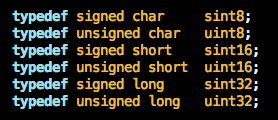
Platform_Types_wrong

When you can do this ONCE and be guaranteed it will work for every single target (and has for the last 15+ years), saving future work:
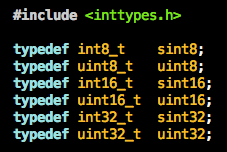
Platform_Types_right

In our own code base, which includes a fair amount of “carry-over” code from previous projects, there are some projects with literally 4 different typedefs equivalent to uint32_t. And the same for all other fixed-width integer types. More work every time someone wants to “carry over” any of that code to a new platform and finds it doesn’t work.

I continue to hear developers in my industry refer to //style comments as “C++” comments, and to insist that they not be used. To be blunt: get with the game. Those aren’t “C++” comments. Those are C comments and have been for more than 15 years. And they exist for good reason; they harbor a smaller set of the dangers of /* ... */ comments and involve less typing for a large class of comments (single-liners).

Then there’s <stdbool.h>. Use it. A while back I ran across some old code in our project that was carried over from another project, that disturbed me (NOTE: I’m easily disturbed by such things). It looked something like this:
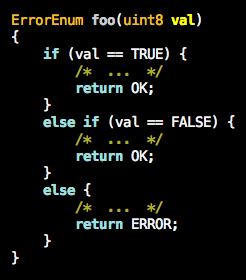
BadUseOf_TRUE_FALSE

I have to wonder how many decent C programmers literally weep when they see this kind of thing in their project, knowing that it hints at problems in the callers. Even for pre-1999 C, this breaks the spirit of boolean. If you need a uint8_t, by all means use it. But in this particular case, the right solution was simply:
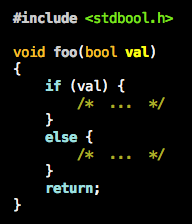
Fix BadUseOf_TRUEFALSE

If you’re a C programmer, don’t party like it’s 1998. Party like it’s at least 2000. Even better, like it’s at least 2011 (the year of _Noreturn, etc.). Get more work done is less time, and consider improvement a life-long process. If the code you write today isn’t significantly better (tighter, easier to read, more readily tested and proven, more reusable, etc.) than the code you wrote two years ago, something is seriously wrong. Regardless of your processes, writing good software is a craft. If you aren’t seeing continuous improvement throughout your career, you’re in a rut that you need to find a way to leave.

Don’t do this to your software team, example 2

Not too long ago, we had an issue on my team that blackholed over a week of my time.

Spoiler alert: the overarching lesson here is to always question and improve your processes, lest they bite you.

I’m currently working on an embedded product with a small amount of safety requirements. As such, the target software must check the validity of the contents of ROM (containing code and constant data) on an ongoing basis. It also must check the stack for corruption or growth above a predetermined bound, run processor tests, etc. The response to problems discovered in any of these tests is a reset followed by a “safe state”.

Fine. Not rocket science, and very common. Easy, right? Well, yes, if your development process is checked for sanity…

A development detail: our chosen method of proving ROM validity is to add a 32-bit CRC to the end of each section of ROM that must be checked for validity. Each CRC is calculated at build time, and needs to wind up in ROM on the target microcontroller so that the software on the target can recompute the CRC at runtime on a periodic basis and compare its result to the precalculated CRC. If the value calculated at runtime doesn’t match the precalculated value stored in ROM, the ROM is considered invalid and remediation must occur. In our case, a reset followed by a “safe state”.

Problem 1: “How do I get that precalculated CRC into the ROM image for the target as part of the build process?” The easy answer is to insert it into the S-Record file that is used as input to the flash programmer or debugger when flashing the target. It’s easy because S-Record files are trivial to parse and many tools are readily available for this step of the process (Vector’s Hexview, the open source srec, et. al.). In our case, we’re using my own dwmhex tool that I wrote many years ago.

Problem 2: here’s where previous project ran into trouble. The debugger needs an ELF file when debugging. The S-Record file is absent of symbols and other information needed for productive debugging. We don’t modify the ELF file to add the CRC information (though we could, it’s been too long since I’ve used libelf for it to be a productive use of my time).

There must be a way to tell the debugger to load symbols and other debugging information from the ELF file but to flash the target with the S-Record file, right? Yes, of course. Any embedded debugger worth its salt provides this functionality.

Unfortunately, for some reason, previous projects were not aware of how to leverage this common debugger feature. Hence they always loaded only the ELF file in the debugger, and let the debugger translate the ELF when flashing the target. Big problem: the ELF doesn’t contain the precalculated CRC values, so if you let the code run, it will result in a reset. Quickly. Making debugging impossible.

The solution in previous projects? Preprocessor conditionals preventing the inclusion of the ROM CRC calculation and other test code in debug builds. This is terrible practice. A rough analogy: if you built a bridge, then drove an empty truck across it, would you then declare it good enough to handle a fully loaded truck? You can’t debug code that wasn’t even compiled into the image for the target. And as a general rule, you should avoid producing dramatically different code for release versus debugging when the debugger doesn’t work with release builds.

How we were bitten…

One of our young engineers was thrown into the project without proper guidance. He added the sanity-checking code, but he only tested using the debugger and a “debug” build. Because he had wrapped all of the sanity-checking code with preprocessor conditionals that excluded the sanity-checking code from “debug” builds (as done on previous projects), most of the code he had just added was completely untested; it didn’t even exist in the “debug” build. He committed the code, not knowing whether or not it actually worked for release builds. And as other team members were busy with other tasks (it was a development release week), no one noticed until about a week later when everyone updated their working copies, compiled a “release” build, and flashed their devices. And in the process, turned them into bricks. The resets were so frequent that it wasn’t even possible to reflash the parts via the bootloader. The bootloader would jump to the application and the application would reset nearly instantaneously.

Other team members reverted to earlier code so they could continue their work. I rolled up my sleeves and dug in my heels…

In the end, there were six different causes of resets in the code. It took me over a week to find and fix all of them. Our young engineer had assumed that we were already putting the CRC values into the S-Record files, which wasn’t true (we hadn’t added that to our build process yet). A set of assembly routines obtained from the microcontroller vendor for processor tests were committed without review, and unfortunately that code made some very egregious assumptions about how it could use RAM: it had hardcoded addresses for its RAM usage that caused it to stomp on our stack sentinel and we hence failed our stack test. etc.

But the bigger failure here was the violation of some fairly universal software tenets:

  • Don’t create unnecessary differences between “debug” and “release” builds. It will waste precious development resources today or tomorrow, guaranteed.
  • Unless prohibitively expensive to do otherwise, NEVER create release builds that have MORE code than debug builds. Or more accurately, don’t put code into a release build that isn’t readily debugged. Obviously, clicking on a few checkboxes in the debugger GUI does not qualify as prohibitively expensive, especially when it remembers your settings across debugging sessions (I’d call this essentially “free”).
  • Trust and nurture your gut instinct. If you think, “There MUST be an easier way to do this…”, odds are good that you’re right. If the cost of not finding that way is anything above piddly, it’s your job as a software engineer to find that way. And it might be as easy as asking an engineer in the next aisle or blasting out an email. A specific example documented here: “There MUST be a way to tell the debugger to flash an S-Record file to the target while loading symbols and other debugging information from an ELF file!” You’re correct. Common problem with common solutions.
  • Always question your processes. If something smells awful, it’s probably a turd. And as a cynical friend of mine likes to say, a polished turd is still a turd.
  • Don’t throw your young engineers into a hot frying pan and then proceed to burn them to a crisp. Help them be successful!

Don’t do this to your software team, example 1

It’s been ages since I’ve posted to my blog. But yesterday I found something in some code at work that prompted me to start a new set of posts.

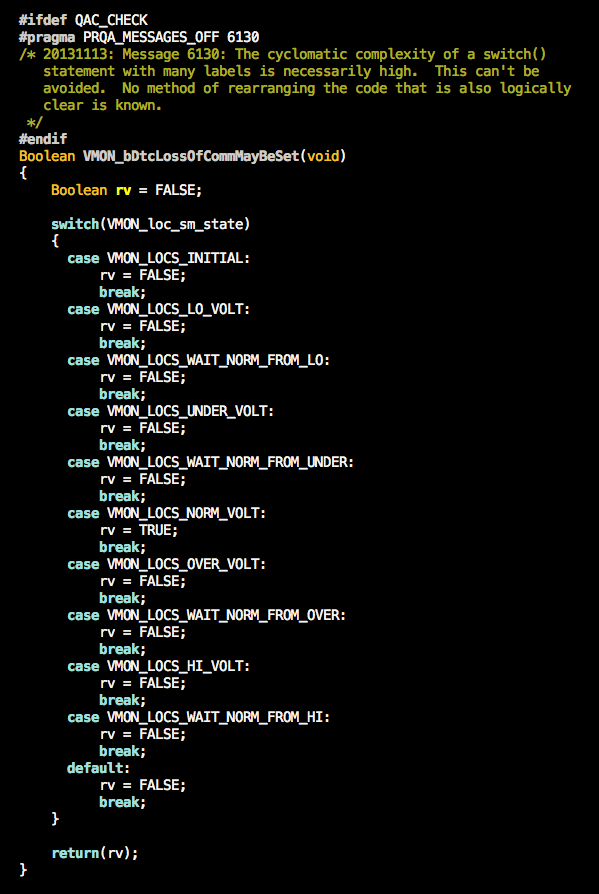
The following is an example of something gone awry and then never reviewed or repaired until someone “discovered” it (in this case, me). Since the original author of this bit of code no longer works for the company, I am not aware of the motivation for this original form. My best guess is that it was boilerplate code pasted into their editor of choice, then later committed without review or correction. Here’s the original code:

BadCode

There are a few troubling things about this code. The first is that the logical equivalent, which I used to replace this code, is an easy to understand one-line function:

BadCodeReplacement

The second troubling thing is that only a few seconds were required to recognize the bad code and its replacement, and another few to type in the replacement. Even without my daily allowance of coffee, this falls into my 15-second refactoring category.

The third troubling thing is the suppression of QAC message 6130. QAC is a static analysis tool, one of several we use to find potential problems in our software. Message 6130 is for cyclomatic complexity. I’m not going to explain that here, I’m only going to point out that the general response to a warning from a static analysis tool should not be “Just suppress the warning.”

The last troubling thing is the clearly incorrect comment associated with the suppression of the static analyzer warning.

It’s easy to argue that any decent optimizing compiler would recognize the intent of the first version as being the same as the replacement, and produce equivalent assembly. And in fact the compiler we use did just that. That’s not the point. The points are really simple:

  • Don’t force yourself and your coworkers to read 38 lines of mostly superfluous code when they could just read 1 very easy line.
  • Don’t throw a blanket over the warnings from your static analyzer.
  • Don’t commit boilerplate code (including a boilerplate suppression of a static analyzer warning with a clearly incorrect comment) without at least reviewing it. If it smells bad, it probably is bad, even if your static analyzer doesn’t flag it. Ask for a second pair of eyes. Make the code available for peer review.
  • Don’t turn your brain off when putting comments in code. A grossly incorrect comment is considerably worse than no comment at all.

moshi luna keyboard

img_7998

My moshi luna keyboard. This replaced the das keyboard Model S Professional for Mac that had problems with KRO. So far, I like it. It’s very similar feel-wise to my Macbook Pro keyboard, though the scissor switches are a bit stiffer. It doesn’t match the feel of the das, nor the feel of any of my Unicomp or IBM Model M buckling-spring keyboards, but it’s backlit and not nearly as ugly as any of the others. If the switches were just a tiny bit weaker like the Apple keyboards, I’d be in love with it.

My next keyboard will probably be a Matias. I wish they would make a Mac version of the Mini Quiet Pro.

Unicomp mechanical keyboards: still king after 20 years

I’ve recently been looking at some of the heavily marketed mechanical keyboards on the market. Take your pick of companies… Razer, Das, CoolerMaster, Ducky, Matias, others.

I actually own a das Model S Professional for Mac that I bought less than 6 months ago but have already retired. I was using it on my hackintosh. For some reason its KRO is poor. I don’t know if it’s a Mac issue or a keyboard issue, but I regularly had problems with missed keys even though I am certain the keys were struck. I know because it’s repeatable. So even though there are many who regard the das Model S Professional as a very good keyboard, I think it’s not worth anywhere near its price. Cherry MX blue switches are nice, but the das is doing something between the switches and USB that renders the whole experience rather suboptimal.

And of course the keycaps on the das for Mac are low quality. The printing wears off very quickly, and isn’t very readable even when new. For someone that switches keyboards and operating systems multiple times per day by necessity, poor keycap printing is a problem. I replaced the keycaps with a custom set I designed myself and bought from wasdkeyboards.com. I used black on white and had no signs of the keycap printing wearing off after many months of every day use. If you insist on buying a das keyboard for your Mac, I highly recommend replacing the keycaps with ones that are actually useful. You can find my design here.

My conclusion: the Unicomp buckling-spring keyboards are still king of mechanical keyboards, being based on the venerable IBM Model M. For the Mac, you want the Spacesaver M, in black or white.

I’ll give the Matias Tactile Pro the runner-up spot. Note that I have not yet tried their Quiet Pro, which has modified Alps white switches and is quieter than the old Tactile Pro.

What am I using right now? A moshi luna backlit keyboard. Yes, it has scissor switches, which most mechanical keyboard lovers despise. However, the moshi luna is the closest thing I’ve found to my Macbook Pro’s keyboard, so it’s at least familiar to me. And I do like the backlighting, though I could live without the silly bling of the lighted acrylic surrounding the keyboard. In fact I might paint it or cover it with very thin aluminum.