
I’ve been using a pair of 24″ monitors for what seems like eternity. Each is running at 1920×1200 resolution. I’ve also been using xmms for a long time, mostly for listening to live National Public Radio streams, software-related podcasts, industry podcasts, etc.
A problem I’ve had with xmms in my setup… the default size is too small, and at double size the skins tend to look terrible. It’s also way too much work to make my own skin that matches my desktop.
The good news is that xmms has a remote control facility that’s nearly full-featured and accessible using an API. On FreeBSD this API is part of the xmms port (/usr/ports/multimedia/xmms). The API function prototypes wind up in /usr/local/include/xmms/xmmsctrl.h on FreeBSD 8.2-STABLE. You can find example usage in the port for the command-line tool xmmsctrl, which is in /usr/ports/audio/xmmsctrl.
Hence I wrote my own simple xmms control application that is cosmetically similar to my dwmqlaunch program. The background of the main window is transparent.
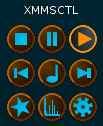
Here’s a picture of it with dwmqlaunch below it.
